
The best smart door lock for Canadian homes in 2026
Winter slush, gloves, dead batteries at the worst moment, kids who lose keys. We looked at what actually matters on a Canadian front door and picked one lock that covers the most ground: the eufy FamiLock S3 Max, a palm vein deadbolt with a built-in 2K video doorbell.
Affiliate disclosure: we may earn a commission if you buy through our links, at no extra cost to you.
What to look for in a smart lock in Canada
Most smart lock reviews are written for mild climates. A Canadian front door sees freeze–thaw cycles, wet mittens and long stretches without anyone checking the battery. These are the six things we weigh first.
See how our pick handles them →Cold weather and moisture
The outdoor half of the lock takes the abuse. Look for a published water and dust rating (IP65 means dust-tight and protected against water jets), a sealed keypad, and an unlock method that still works with cold, wet or gloved hands. Fingerprint pads can struggle with dry winter skin; contactless options avoid that problem. If a maker publishes an operating temperature range, compare it with your region’s winter lows.
Battery life and backup power
Cold drains batteries faster, so quoted battery life is a best case. Prefer locks with low-battery alerts in the app, a second power source (backup cells or an emergency charging port), and a physical key override. Rechargeable packs save on AA costs but mean bringing the pack inside to charge, so check how the lock behaves while it’s off the door.
Wi-Fi vs Bluetooth
Bluetooth-only locks sip power but only work when your phone is nearby. Built-in Wi-Fi lets you lock up from the office, hand out temporary codes and get alerts, at the cost of more battery use. Some locks use a separate hub or bridge for remote access. Make sure your router’s signal actually reaches the front door before you buy a Wi-Fi model.
Unlock methods for the whole household
Count the people who use the door: kids, older parents, a dog walker, a cleaner. A good lock offers at least three ways in (biometric, PIN code, app, key) and lets you add or delete users from the app without resetting the hardware. Temporary or scheduled codes are worth having if you host guests or rent out a suite.
Installation and door fit
Most deadbolt-replacement locks fit a standard North American bore, but always check the supported door thickness and backset. Storm doors can block cameras and scanners, and some latch recesses need a different faceplate. Look for the security grade too: ANSI/BHMA Grade 1 is the highest residential rating for deadbolts.
Privacy and subscriptions
Biometric data and doorstep video are sensitive. Find out where they’re stored (on the lock, on a local hub, or in the cloud) and whether useful features sit behind a monthly plan. Locks that keep biometric templates on the device and record locally give you more control and fewer recurring costs.
Our top pick: eufy FamiLock S3 Max
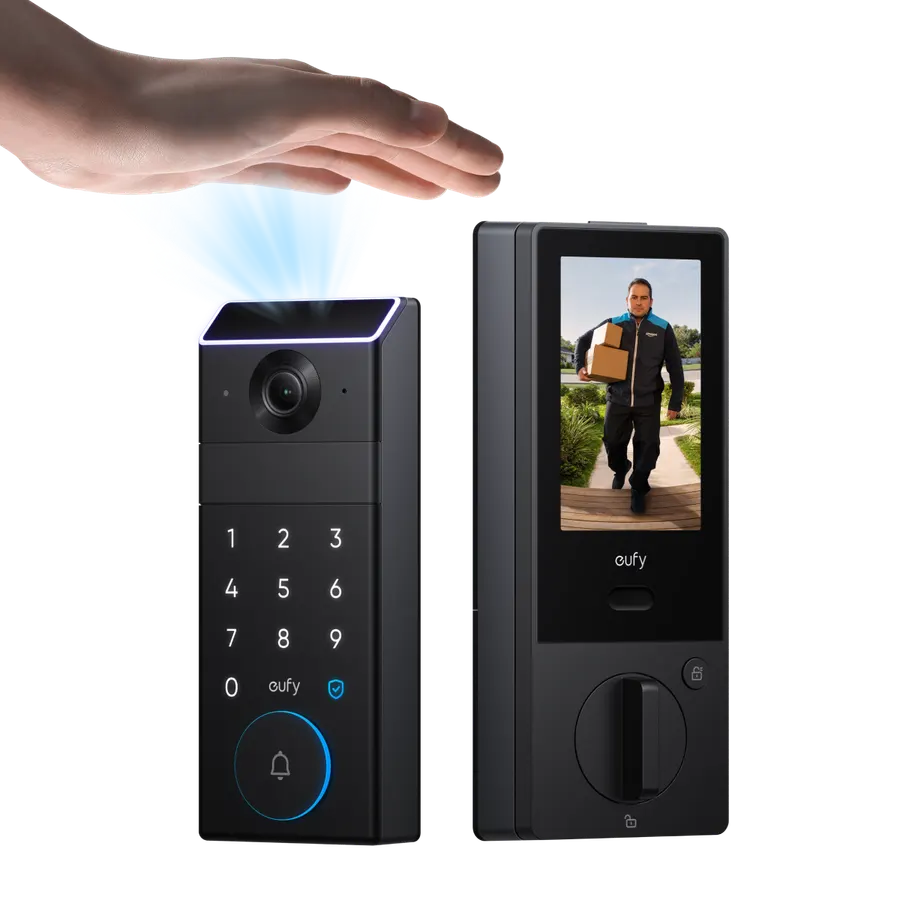
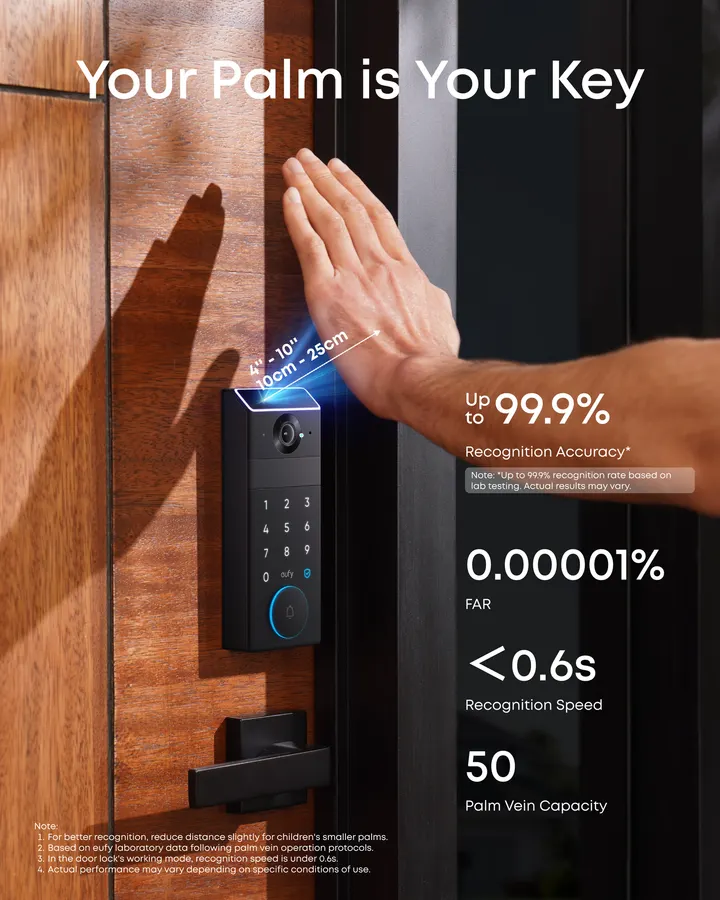
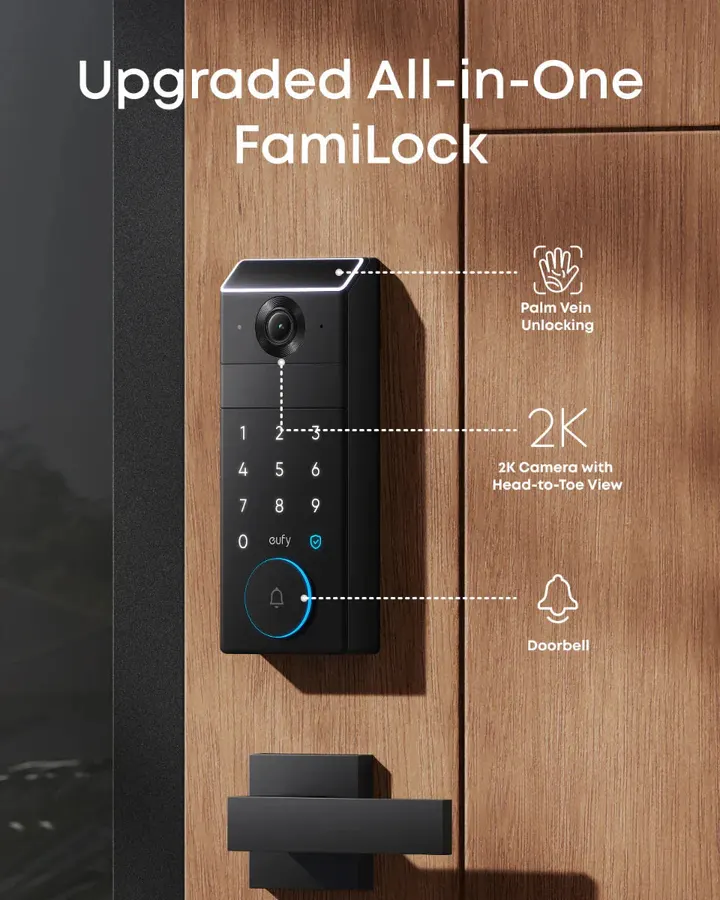
A video smart lock that replaces your deadbolt and your doorbell in one install. Its headline feature is palm vein recognition: an infrared scan of the vein pattern under your skin, which works without touching a sensor.
eufy by Anker
FamiLock S3 Max
CA$549.99 at time of writing on anker.com/ca, check the store for the current price
- Unlock methods
- Palm vein, PIN code, app, voice control, physical keys
- Palm recognition
- About 0.6 s, up to 50 stored palm profiles, data kept on the lock
- Camera
- 2K HDR with night vision, 150° wide angle, built-in video doorbell
- Indoor screen
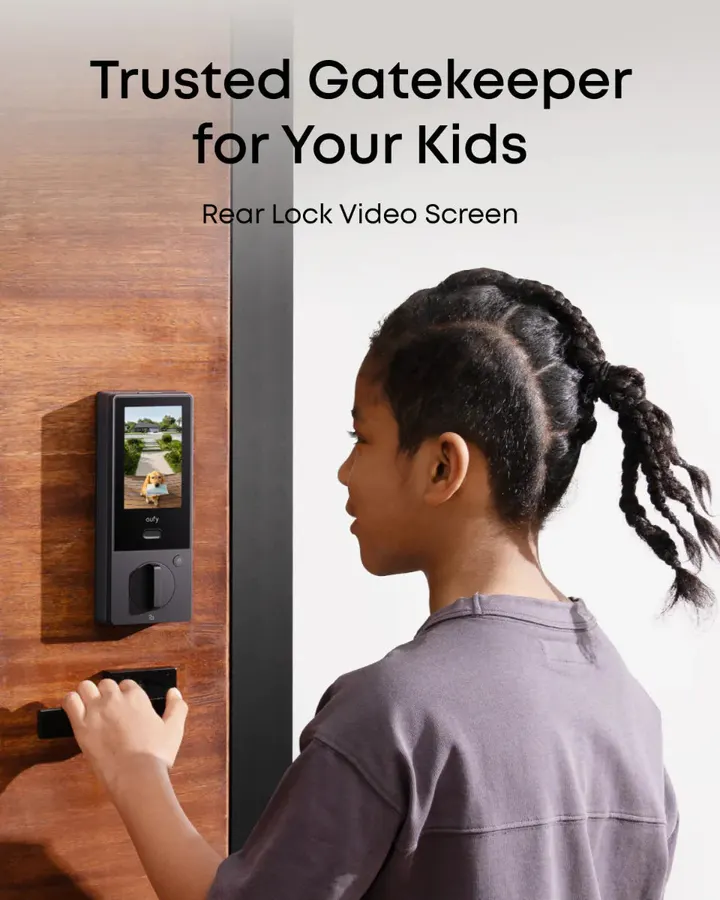
- 4-inch display on the interior unit to see who’s at the door without the app
- Power
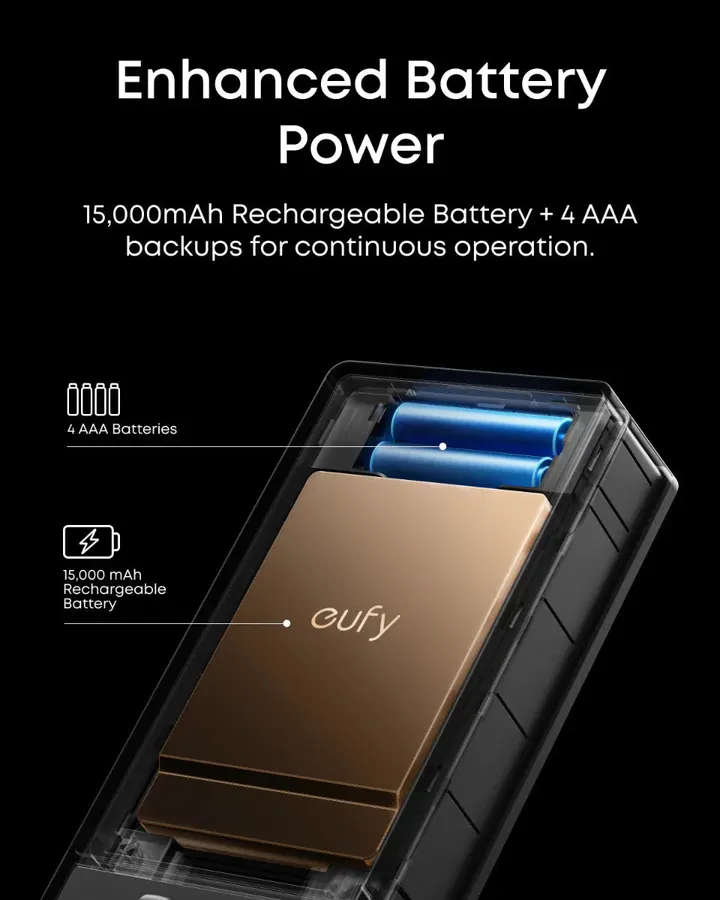
- 15,000 mAh rechargeable battery + 4 AAA backup, up to about 5 months; 5V/2A charging
- Connectivity
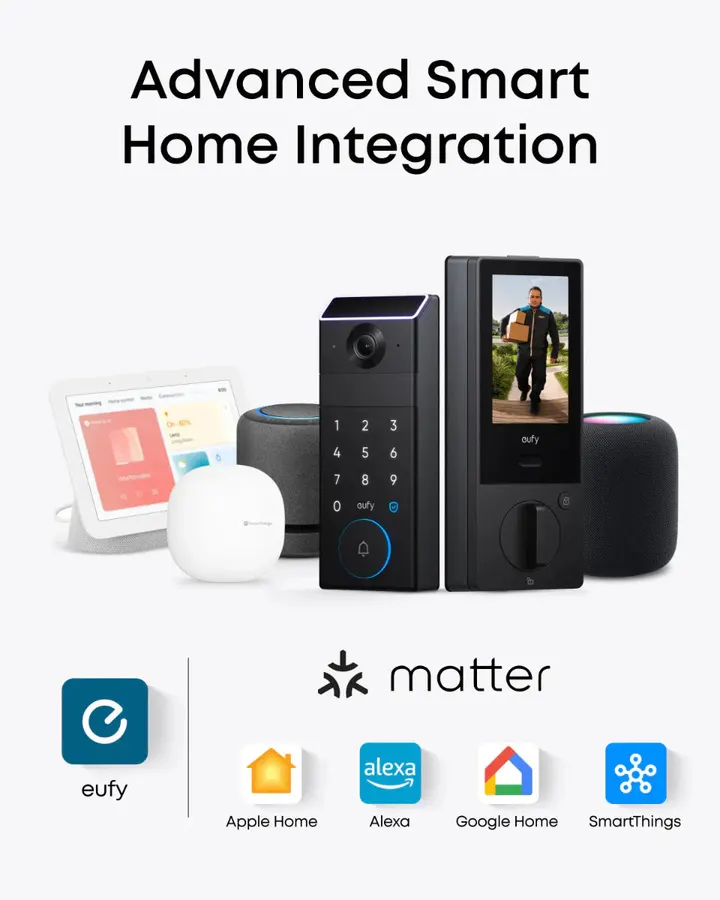
- Built-in Wi-Fi; Matter (Apple Home, Google Home, Alexa, SmartThings); eufy HomeBase 3
- Auto-lock
- Door sensor based
- Durability
- ANSI/BHMA Grade 1, IP65 weather rating
- Door fit
- Door thickness 35–55 mm
Why it suits Canadian homes
- Contactless palm scan, so wet, cold or dirty hands and worn fingerprints are less of an issue than with a fingerprint pad
- Two power sources: when the main battery runs low, the AAA cells keep PIN code entry working
- One install covers deadbolt, 2K doorbell camera and indoor screen
- Palm data stored locally on the lock, not in the cloud
- Highest residential deadbolt grade (ANSI/BHMA Grade 1) and IP65 rating
- Matter support brings it into Apple Home, Google Home, Alexa or SmartThings
Worth knowing first
- Premium price compared with keypad-only deadbolts
- Palm vein unlocks only; locking is done by auto-lock, app, keypad or by hand
- Not recommended behind a storm door, which can block the camera view
- Fits doors 35–55 mm thick; round latch recesses need a faceplate from eufy support
- Can’t connect to HomeBase 3 and an external Matter gateway at the same time
- The rechargeable pack still needs charging every few months
What owners commonly mention: the palm scan still works in the rain, activity alerts arrive quickly, they like that recordings stay on the device without a subscription, and the battery has lasted months between charges.
Summary of owner feedback on the Anker Canada store, October 2026
Other options, by type of lock
Not every door needs a camera lock. Here’s how the main categories compare, so you can tell whether a simpler lock fits your situation better.
Simplest upgrade
Keypad deadbolt
Replaces your deadbolt with a code pad and usually keeps a key. Good for rentals and side doors where you just want to stop carrying keys.
- Best for
- Budget-minded homes, secondary doors
- Trade-off
- Codes can be shared or watched; few smart features
Fast biometric
Fingerprint deadbolt
A touch sensor on the keypad. Quick for most adults, usually with PIN and app backup. Sensor performance with dry, cold or wet fingers varies by model.
- Best for
- Families who want speed at a mid-range price
- Trade-off
- Can struggle with worn prints, gloves, wet hands
Keep your hardware
Retrofit (interior-only) lock
Mounts over the inside thumb-turn and leaves your outside deadbolt and keys alone. Popular with renters and condo owners who can’t change the exterior.
- Best for
- Renters, strata or condo rules
- Trade-off
- No outdoor keypad unless added separately
All-in-one handle
Lever or handle smart lock
Replaces the handle set instead of the deadbolt, often with a sensor in the lever. Handy for garage entry doors, offices and doors with no deadbolt bore.
- Best for
- Side, garage and interior doors
- Trade-off
- A spring latch alone is less sturdy than a deadbolt
Lowest power draw
Bluetooth-only lock
Unlocks from your phone when you’re close by. Long battery life, simple setup, but no remote control unless you add a hub or bridge.
- Best for
- Cottages with weak Wi-Fi, low-traffic doors
- Trade-off
- No alerts or remote access out of the box
Our pick’s category
Video smart lock
Deadbolt, doorbell and camera in one unit, so you see who’s there and let them in from the same app. The FamiLock S3 Max adds palm vein entry and an indoor screen.
- Best for
- Main entrances, package-heavy households
- Trade-off
- Higher price, more battery demand
Installing a smart deadbolt, step by step
Most smart deadbolts are a do-it-yourself job with a screwdriver and no wiring. Set aside an unhurried hour, and do it on a mild day: you’ll have the door open for a while.
-
Measure the door
Check door thickness, backset and bore diameter against the lock’s specs. For the FamiLock S3 Max, the door should be 35–55 mm thick. Note whether your latch recess is square or round, and whether a storm door sits in front.
-
Remove the old deadbolt
Unscrew the interior thumb-turn, pull out both halves and the latch. Keep the old hardware until the new lock is fully working.
-
Fit the latch and exterior unit
Install the new latch, then pass the exterior unit’s cable through the bore to the inside, keeping it clear of the latch so it can’t pinch.
-
Mount the interior unit and power up
Attach the mounting plate, connect the cable, seat the interior unit and insert the charged battery (plus backup cells if your model has them).
-
Pair with the app and add users
Follow the app to join your Wi-Fi, calibrate the door, register palms or fingerprints and create PIN codes. Test the lock with the door open, then closed, before you rely on it.
-
Check it again each fall
Wood doors move with the seasons. Before winter, check that the bolt slides freely into the strike, wipe the scanner and camera lens, and top up the battery so cold weather doesn’t catch you short.
Smart lock questions from Canadian readers
Do smart locks work in Canadian winters?
Many do, but check the outdoor rating and how the unlock method copes with cold hands. The FamiLock S3 Max has an IP65 rating and a contactless palm scanner. Batteries drain faster in the cold, so keep an eye on low-battery alerts during deep freezes.
What happens if the battery dies?
On the FamiLock S3 Max, when the lithium battery runs low the four AAA backup cells provide emergency power so you can still lock and unlock with a PIN code (other functions pause). It also has physical keys. Other locks may use an emergency USB port or key override instead.
Is palm vein recognition better than a fingerprint sensor?
It reads the vein pattern under the skin with infrared light, without contact. That makes it less affected by wet, dirty or worn fingertips. Fingerprint locks are often cheaper and very quick in good conditions. Which suits you depends on your household and budget.
Do I need a subscription?
Not to lock and unlock. The FamiLock S3 Max stores palm data on the lock, and owners mention that recordings are kept on the device. Check eufy’s current terms for any optional cloud services.
Will it work with Apple Home, Google Home or Alexa?
The FamiLock S3 Max supports Matter, which connects it to Apple Home, Google Home, Alexa and SmartThings. It also works with eufy HomeBase 3, but not with HomeBase 3 and an external Matter gateway at the same time.
Can I install it myself?
Yes, in most cases. It replaces a standard deadbolt on doors 35–55 mm thick. It’s not recommended behind a storm door, and a round latch recess needs a round drive-in faceplate from eufy support.
How many people can use it?
Up to 50 palm profiles can be stored, and you can add or remove users and codes in the app without resetting the lock. Palm vein is used to unlock only.
Are smart locks as secure as regular deadbolts?
The bolt itself matters most. Look for ANSI/BHMA certification; Grade 1 is the top residential grade, and the FamiLock S3 Max is rated Grade 1. Pair any deadbolt with a solid strike plate and long screws into the frame.
Ready to retire the key under the mat?
See the current price, bundles and shipping details for the eufy FamiLock S3 Max on Anker’s Canadian store.
Check price at Anker CanadaGridDiscount is an independent guide operated by Cruz Graphic Design. We may earn a commission from qualifying purchases. Prices and availability can change; always confirm on the retailer’s site. Read our disclaimer.